Randy Young, the Graphics System Software Quality Assurance Engineering lead guru for the AutoCAD Team wrote an excellent article on solving the worlds troubles, well at least AutoCAD Graphics related ones. Tom Stoeckel of AutoCAD Support posted it to the Without a Net Blog. Checking Your AutoCAD Graphics
I am also publishing the article here due to the value it has in troubleshooting AutoCAD crashes that could be graphics related.
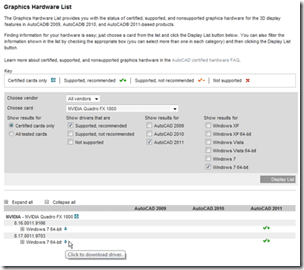
Every year AutoCAD configurations get more complex. For example, one large jump in complexity happened in AutoCAD 2007 when we introduced Hardware acceleration. As new features are introduced – such as the new Advance Material Effect, and Smooth line display in AutoCAD 2011 – we become more and more dependent on the support of our hardware partners. Prior to AutoCAD 2007 we only had a dependency on the operating system, but since then we have also become more dependent on graphics cards and drivers. Each new level of dependency brings new potential for interoperability issues. To cut down on the complexity of these dependencies and improve user experience we have created a hardware certification program within the AutoCAD team that is located at this site:
Reason:
As we find drivers that have issues such as the ones in this posting, we have begun blocking hardware acceleration for them to protect users from losing productivity or, worse yet, unsaved data.
Process:
To check if you have the latest certified driver you can either go to the AutoCAD certified hardware web page (http://www.autodesk.com/autocad-graphicscard), and/or you can check in-product.
To check in-product see the steps below:
Note: You must be an administrator for Microsoft® Windows Vista® & Windows 7 operating systems, and have User Account Control (UAC) disabled.
1. Type “3DCONFIG” at the command line and hit “Enter”.
2. Click the “Check for Updates” button (Highlighted in blue in the image below)

Note: This button checks for updated versions of the graphics card and driver database that is used for performance tuning.
3. If there is an available update it will ask you if you want to replace it by clicking “Yes”. 
4. After it is updated you will get a message that says “Your Performance Tuner File is Up to date”, then click “View Tuner Log” button. 
5. The View Tune Log will show you if you hardware is certified, it will also show you your current application driver, an example is shown below. If your current driver says anything other than Software or AcadDM10.hdi, i.e., nvgl10.hdi, please see these links (Link1 & Link2) and switch your driver back to the Autodesk Driver.

6. If your system shows you do not have the latest certified graphics card driver, you need to go to the certification site (http://www.autodesk.com/autocad-graphicscard) to download the latest version. To download the latest version click the little blue arrow next to the corresponding driver for you hardware and operating system.

By keeping your system up to date with the latest driver you will avoid losing both productivity and potentially unsaved work. If you have any questions see the FAQ site and if you have any issue not on the FAQ please feel free to send us a message at the feedback link.
Good luck on your next project,
Randy Young
AutoCAD Test Development

Thank you for the information. Was having a lot of trouble with autocad since updating to windows 7. After following these steps i discovered my graphics card wasnt the latest version. After updating all is going good again. Thank you once again.
I am plotting autocad sheet that contains a ole link schedule from our sheet set manager and when it plots out it is just a blob of in lines that are not legible and no text whatsoever as well. I am in Autocad 2010 by the way.
It’s great to hear that you’re now blocking hardware acceleration.. Great way to insure Nvidia/AMD gets to sell another $1500 card with broken functionality, while screwing any user with a perfectly functional, and often times faster, consumer graphics card. (oh yeah I forgot the cool-aid, it’s actually different hardware designed just for high precision professional graphics!)
If the pro cards worked flawlessly then the ‘support’ argument might hold water.. but it’s just overt price gouging at this point.
Great to finally have smooth line display.. 10 years late, but better than never I guess.
43st,
I am not sure I fully understand your comment without more details on your hardware. We do not block hardware acceleration but perhaps you have a very old system hardware. You do not need a $1500 video card for AutoCAD in fact some lower price cards work very well depending on how you use AutoCAD.
Best Regards,
Shaan
I would suggest using insert as a native AutoCAD Table rather than pasting as an OLE object which can have multiple problems related to how OLE works.
Please have a look at an older post I made on the topic.
http://autodesk.blogs.com/between_the_lines/2008/10/link-excel-and.html
Best Regards,
Shaan
Thank you very much for the feedback. I am glad the information helped you.
Cheers,
Shaan
We are having all sorts of performance problems with a brand spanking new clean workstation (Win7pro 64bit, Intel i7, 8GB RAM, Certified 512MB Nvidia Quadro FX580, 750GB SATA HD). After install Autocad LT 2011 is extremely slow, even with the latest drivers.
The above graphics card is certified for ACAD LT2011 but all autocad forums I have looked at say that to tweak the driver I need to use the 3Dconfig command in Acad. Obviously this command is not available in LT.
Frankly, it seems to me like the 2011 release of the software could be buggy – If I cant find a fix I may have to return my copies to the dealer I brought them from.
Any ideas?
Matthew,
I am sorry to hear you are experiencing some issues, so lets try and figure out what is going on.
First, make sure you are sending CER reports after you crash as that tells us what is going on under the hood at time of crash.
Second email me your driver version:
1) Right click on the desktop and choose screen resolution.
2) Advanced settings
3) Properties button
4) Driver tab
Then reply to this post with what the driver number is something like 8.16.001.9703 or you can email me directly at shaan@autodesk.com.
Sincerely,
Shaan Hurley