AutoCAD 2010 Share with Autodesk Seek Functionality
With many of the new 2010 based products Autodesk is releasing, there is the new ability to share content with Autodesk’s Seek free online content service.
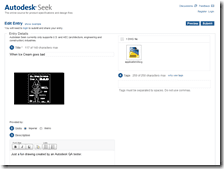
In AutoCAD 2010 on the Output ribbon tab I selected the Share with Autodesk Seek and then selected a block I wanted to share. The block was When Ice Cream Goes Bad” from coworker Cliff Young. It is a simple process where I upload and then I am presented with a page to add a content description, tags, etc. You do need to register for a new and FREE Autodesk Seek account.
So…
Share and Share alike, and Seek and you shall find!
Cheers, Shaan
4 comments
Hello Shaan,
Can I ask you some info regarding your Seek Post? Seems that neither SEEK or SHAREWITHSEEK are functional as a command in the final 2010 version. RMB on a block does not show any Shortmenu to publish/share the geometry ?
Am I missing something here ?
Thank you for your time
Best Regards.
Loading...
DEVIDTS,
The commands definitely are there in AutoCAD 2010. Can you find it on the Output ribbon panel?
Are you sure you are running AutoCAD 2010?
Best Regards,
Shaan
Loading...
Autodesk Seek is good.
But I’ve installed the italian version and it says that the commands _SEEK and _SHAREWITHSEEK don’t exist and I can’t find the SHAREWITHSEEK button.
Best Regards.
Loading...
Is this plain AutoCAD? I am not aware if SEEK functionality is not in the local language versions but will inquire about it with the localization group.
Thank you for your comment.
Sincerely,
Shaan Hurley
 With many of the new 2010 based products Autodesk is releasing, there is the new ability to share content with Autodesk’s Seek free online content service.


Hello Shaan,
Can I ask you some info regarding your Seek Post? Seems that neither SEEK or SHAREWITHSEEK are functional as a command in the final 2010 version. RMB on a block does not show any Shortmenu to publish/share the geometry ?
Am I missing something here ?
Thank you for your time
Best Regards.
DEVIDTS,
The commands definitely are there in AutoCAD 2010. Can you find it on the Output ribbon panel?
Are you sure you are running AutoCAD 2010?
Best Regards,
Shaan
Autodesk Seek is good.
But I’ve installed the italian version and it says that the commands _SEEK and _SHAREWITHSEEK don’t exist and I can’t find the SHAREWITHSEEK button.
Best Regards.
Is this plain AutoCAD? I am not aware if SEEK functionality is not in the local language versions but will inquire about it with the localization group.
Thank you for your comment.
Sincerely,
Shaan Hurley