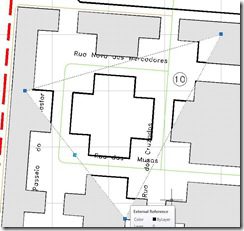
To be able to do this set the drawing saved system variable XCLIPFRAME to 1. You can then change the XCLIP boundaries with the grips and if you select the arrow you can invert the XCLIP.
You can see the grips and adjust the XCLIP Boundary dynamically now in AutoCAD 2009 and even select the Arrow to Invert the XCLIP.
And after inverting the XCLIP
This is pretty useful and powerful! As Matt Murphy would say “WICKED COOL”.
Cheers, Shaan (Currently traveling from Kuwait to Dubai, then home tonight)