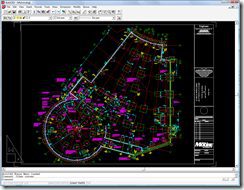
 It has been 11 years since AutoCAD R14 was released and it was long before Microsoft even considered a Windows Vista Operating System. Being one that likes to run the older versions of products for comparing features as well as pure geek’ish fun I was getting smartheap errors on Windows Vista when trying to run AutoCAD R14 until I found NinjaWaynes post with a solution posted in the Autodesk discussion forums that works. The solution is in the lengthy thread and includes the Vista version of the SH31W32.DLL that solves the issue of R14 compatibility with Windows Vista
http://discussion.autodesk.com/thread.jspa?threadID=543852
 Of course this solution is not official or supported and you are on your own for any side effects it may have but you end up being able to get AutoCAD R14 running on Vista without the errors. You should also be aware that since AutoCAD R14 was not designed with Vista in mind there are some features or drivers that may not work with today’s Operating System.
R14 sure seems fast but it is also lacking many of the essential productivity enhancements over the past 11 years some as simple but vital as the double wheel click zoom extents, multiple documents, or the match Hatch properties that did not appear until AutoCAD 2000.
<AutoCAD Historical Nugget> I joined Autodesk during the AutoCAD R14.01 Update codename Pinetop and was an Autodesk customer and product user prior. I was even a customer that was featured on the AutoCAD R14 demo CD and the live launch broadcast beamed around the world to many in movie theaters. </AutoCAD Historical Nugget>
Have fun!
-Shaan

HA! That plan is the foundation for the butterfly house my firm did years ago. We submitted the dwg for the color gallery that was included in the R14 manuals.
Trying to re-install R14 on Vista Home, here is this error message:
16 bit Windows Subsystem
C:\Windows\SYSTEM32\CONFIG.NT. ( . This required system file is missing. Choose ‘Close’ to terminate the application.
Any hint?
R14 worked fine since some days ago, but I think after some Vista Updates it ended working..
I certainly don’t have that product and believe it was handed off by Ketiv to an organization a longtime ago.
PING:
TITLE: AutoCAD and the New Windows Vista
BLOG NAME: Between the Lines
Autodesk will be announcing official details on Microsoft Windows Vista support for AutoCAD and AutoCAD LT in the next 2-4 weeks so please check http://www.autodesk.com/autocad for more information. In the meantime, please note that no official statement has …
I’ve just come across this as I’m trying to load an old copy of 14 on a Vista machine. I’ll try the solution, thanks.
Was there any way of getting AEC5 to install, it won’t allow it to install at all, let alone load. Any ideas?
Many thanks
Dave,
Not sure what AEC5 is but getting old applications to run on Operating Systems they were never designed for is a real challenge and many possible issues. I would consider the compatibility mode of the OS as an option or a virtual machine with an old OS version.
Regards,
Shaan
Shaan:
Any hope of getting Ketiv ArchT 14 (’95-’97) for my AutoCad R14?
I lost it in a crash. I downloaded a one-time demo (5 days max.), but needed an Authorization Code – which nobody seems to have (Ketiv, MS Visio, Ideate, Autodsys, etc.).
Tim