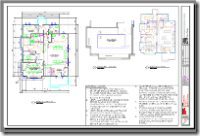
Create an MTEXT object in the lower right box of the drawing.
Copy and paste the text from the ”General Notes.doc” file to the MTEXT object.
Locate the Columns button in the Text Formatting toolbar (In-Place Editor) and select Dynamic Columns mode>manual height. Click OK on the Mtext toolbar.
Change the text into two columns utilizing the grip at the bottom-center of the MTEXT object.
And there you have it, Multiple Text Columns now in AutoCAD.
The Mtext columns is a good feature, but not much help since MTEXT entities are still limited to 32k…
Any thoughts on when this limitation will be removed?
Thanks.
Loading...
R.K.
Yes there is a 32k Mtext limit which is actually quite a lot unless you are writing a book in AutoCAD as you can now have an entire D size cover sheet full of text and now control the columns. It is something on our radar and would require a DWG file format change in addition to a mountain of other work.
Regards,
Shaan
Loading...
Where do you get new Penwill cartoons?
Loading...
Roger Penwill was commisioned to create a few images for us around AutoCAD for problems that AutoCAD 2008 solves.
Last year Roger Renwill did an image of me as an uber geek but that was my real home office and I so looked like a geek. 🙂 http://autodesk.blogs.com/photos/daily_grind_iii/shaan02a.html
Loading...
Shaan,
My original comment should have said “not much help to us for our standard notes sheet” – Sorry.
It’s not a book… Our standard construction notes flutters around 32k, depending on the current revision. Using L80, there is still white space on our 36×24 sheets for additional notes.
Our site plans are on 36×48 sheets, I didn’t check that notes sheet… but I bet it’s more than 32k.
Loading...
R.K.,
After more research the 32k text string length limitation seems really common for many text using applications and platform compatibility. That is about 10 pages of text on a single construction drawing sheet. I created a monster of a E size drawing full of construction notes at 1/4″ and did not run out.
Could you please email me a sample AutoCAD DWG and Text document to show you are exceeding this limit?
Thank you,
Shaan
Loading...
We have just updated our AutoCAD to 2008 and we are discovering that the Mtext drawings that where created in cad 2005 do not display correctly in 2008 versions.
If the Mtext has any formatting in 2005, the same text will change formatting in 2008.
Do you have any solution for that?
Please send me an e-mail back if you have any solution for that.
Thank you,
-J
Loading...
2000 allows for a command listed as
^C^CTXT
which allowed you to pick multiple text, one at a time, which would bring an editor up for the text in the order you picked them, or you could pick mulitple text in a window and they would come up randomly. Either way, the command is unknown in 2009.
Loading...
Wier,
This sounds like you had a custom macro or LISP back in your AutoCAD 2000 version. This looks like the code from your menu MNU which may have referred to this custom tool you had.
To the best of my knowledge this was not something built into base AutoCAD.
Best Regards,
Shaan


The Mtext columns is a good feature, but not much help since MTEXT entities are still limited to 32k…
Any thoughts on when this limitation will be removed?
Thanks.
R.K.
Yes there is a 32k Mtext limit which is actually quite a lot unless you are writing a book in AutoCAD as you can now have an entire D size cover sheet full of text and now control the columns. It is something on our radar and would require a DWG file format change in addition to a mountain of other work.
Regards,
Shaan
Where do you get new Penwill cartoons?
Roger Penwill was commisioned to create a few images for us around AutoCAD for problems that AutoCAD 2008 solves.
Last year Roger Renwill did an image of me as an uber geek but that was my real home office and I so looked like a geek. 🙂
http://autodesk.blogs.com/photos/daily_grind_iii/shaan02a.html
Shaan,
My original comment should have said “not much help to us for our standard notes sheet” – Sorry.
It’s not a book… Our standard construction notes flutters around 32k, depending on the current revision. Using L80, there is still white space on our 36×24 sheets for additional notes.
Our site plans are on 36×48 sheets, I didn’t check that notes sheet… but I bet it’s more than 32k.
R.K.,
After more research the 32k text string length limitation seems really common for many text using applications and platform compatibility. That is about 10 pages of text on a single construction drawing sheet. I created a monster of a E size drawing full of construction notes at 1/4″ and did not run out.
Could you please email me a sample AutoCAD DWG and Text document to show you are exceeding this limit?
Thank you,
Shaan
We have just updated our AutoCAD to 2008 and we are discovering that the Mtext drawings that where created in cad 2005 do not display correctly in 2008 versions.
If the Mtext has any formatting in 2005, the same text will change formatting in 2008.
Do you have any solution for that?
Please send me an e-mail back if you have any solution for that.
Thank you,
-J
2000 allows for a command listed as
^C^CTXT
which allowed you to pick multiple text, one at a time, which would bring an editor up for the text in the order you picked them, or you could pick mulitple text in a window and they would come up randomly. Either way, the command is unknown in 2009.
Wier,
This sounds like you had a custom macro or LISP back in your AutoCAD 2000 version. This looks like the code from your menu MNU which may have referred to this custom tool you had.
To the best of my knowledge this was not something built into base AutoCAD.
Best Regards,
Shaan