I have seen some very clever usage of DWF files on a corporate network. You can show employee locations, printers and in many cases even install and map to the printers of an office as shown in Jimmy Bergmark’s intranet site.
I am showing a couple examples below.
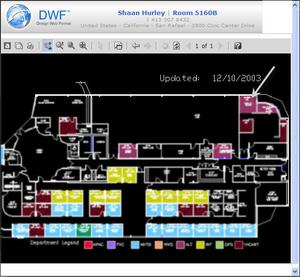
Autodesk Facilities and Human Resources uses embedded DWF files to show the current office locations and associated information. Of course I have not made the clearest screen capture (below) on purpose due to the content such as office numbers in Autodesk facilities.
An employee goes to the corporate intranet site and then types in a search for an employee based on many different criteria just like a search engine. They then get the page with all the employee info and a link to their office shown in a daily updated database created DWF file. The web page has an embedded DWF showing the employee office and all current details at the top of the DWF window. It is originally zoomed in on the office but I grabbed the screen capture when zoomed out. Also the employee and office numbers have hyperlinks back to the intranet site so you know the phone number of the office in a reverse search.

Jimmy Bergmark’s excellent example of using a DWF in his facility in Sweden.
Jimmy uses the embedded DWF in his intranet to display many different office floor layouts. He says they do this because it allows employees at his company to easily connect printers since they move around quite a lot. In the floor plan layouts are all of their corporate networked printers and their mapped locations. Simply clicking on the hyperlinked printer device and you are all ready to print to the device just as you would by manually going through the network setup of a printer but this offers the visual and automated steps and it is so easy to do. Have you ever mapped to the wrong printer when searching through the network for the cryptically named device .
Some screen images of his DWF.


Jimmy’s web site www.jtbworld.com
The possibilities are endless really when you consider the flexibility and lightweight format of DWF.
Cheers,
-Shaan

If any have questions on my solution for Printer Connector using DWF feel free to contact me.
/Jimmy
http://www.jtbworld.com
Is there anyway, using HTML, to enable a user to click a hyperlink that would install a network printer? If this is possible, could you include the code to accomplish this? If you just use the server path \server\printer you get a “page cannot be displayed error” even though the path appears correctly in the browser. Any help would be appreciated.
Mike,
Absolutely you can add a printer using a hyperlink in a web page or a DWF. You need to link to the UNC path to the device. The error you are getting may be due to the printer not being shared or you are part of a network that prevents you from installing printer drivers. If you have specific questions on how Jimmy did this, see his web site and contact him at http://www.jtbworld.com.
I have seen many people use the method of managing printers by DWF, web pages or Visio using this method.
Cheers,
-Shaan